What's New

Follow new updates and improvements to Punch Builder's Lab.

January 28th, 2026

What's new

Scalper Joystick is LIVE (currently only available for Punch Champions)

A lot of you have been asking for this feature for a long time.

Not just in one place, but everywhere we show up — in the Builder’s Lab, during product webinars, on 1-1 calls with traders, and even in Yugandhar’s SMC sessions.

One of our traders pretty much summed this feature up in a post on the Builder’s Lab:

“Need direct setting of target and stoploss on chart, need a setting where we can predefine target (say 10%) and stoploss (say 2%) and each time you place order the target and SL gets placed on chart accordingly and we should be able to drag it.”

What came through very clearly was not just what was needed, but how urgently it was needed.

“It’s very necessary, most important and most powerful feature for option scalpers. Please add this immediately, very very very requested.”

“Very important and a must feature for scalping.”

Across all of them, the underlying problem was the same. Too many steps between intent and execution.

Scalper Joystick is our attempt to remove those steps.

This feature wasn’t designed in isolation. It came from reading long threads, re-reading the same requests week after week, and watching how many of you were already trying to bend Punch to fit fast, short-horizon trades.

At its core, the Scalper Joystick speaks to 4 different use cases repeatedly highlighted by our traders.

First, pre-defining the stoploss, target and lot size

With the Scalper Joystick, you can now pre-define SL/TP/Lot size settings for all your trades executed via the Scalper Joystick.

Second, entry and risk are no longer separate actions.

When you place a trade using Scalper Joystick, the entry goes in along with a pre-defined SL and target, automatically. The position is created with its exits already in place. Hence, an order executed via the Joystick is a bracket order by default.

Third, execution no longer requires an order form.

Buy, Sell, and Exit happen with a single tap. No intermediate screens. No confirmations. This applies whether you’re trading from a single chart or using split view.

This was called out repeatedly by traders, especially during volatile phases:

“One tap instant Buy/Sell/Exit instead of two or three taps. This is very crucial for trade management during volatile times.”

Fourth, you can place limit or trigger orders directly from the chart itself while using Scalper Joystick.

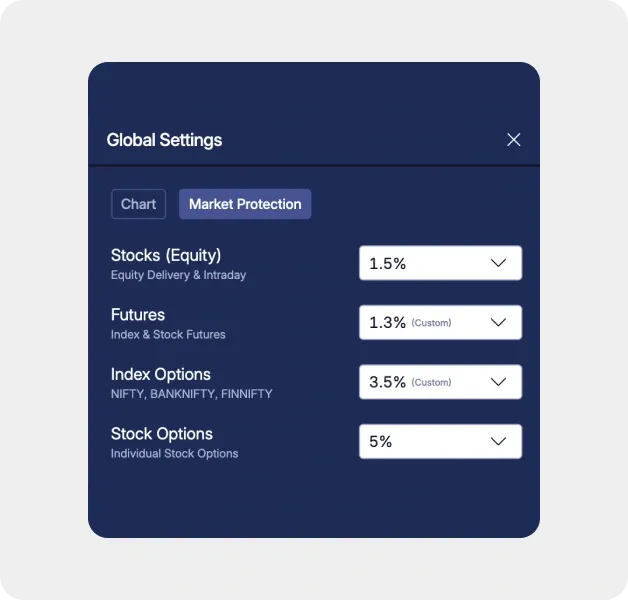
For now, it works for options trading only — including NIFTY, SENSEX, and BANKNIFTY — since the majority of scalping activity happens in these indices. Once the upcoming feature Protection Orders for Equity goes live, Scalper Joystick will extend to equities, stock options, and futures.

Another small but significant problem that gets solved was related to split view.

Many of you pointed out that the order form would often occlude the bottom chart while trading in split mode. This became a key inspiration for building Scalper mode as a Joystick. It sits just below the bottom chart, so you retain full visibility of both charts throughout entry and exit.

Nothing else about Punch changes when you enter this mode. You’re not moving into a different product or a restricted environment. It’s simply a different execution layer.

From a systems perspective, this required significant reworking how orders are constructed and sent. (A key reason for why it took us a bit longer to develop this feature)

One thing that is still missing — and many of you have already pointed this out — is Trailing SL inside Scalper Joystick.

We’re adding that too.

It’s currently in testing. This has taken longer than we originally expected due to a few issues we had to work through on the order-management side. I know this delay has been frustrating, and that feedback is fair. We’ll share an update as soon as it’s ready to go live.

Scalper Joystick exists because enough of you pushed for it, explained why it mattered, and didn’t let the request die out.

It’s LIVE now.

Use it, break it, and tell us what still feels off. We’ll keep iterating.

January 21st, 2026

What's new

Issue fixed

A few weeks ago, we made Drag & Drop SL/TP and new chart types (Heiken Ashi, Renko, Line & Bars) available to all users.

Since then, we’ve been able to close a large number of pending requests from the Builder’s Lab. I’ve personally been tracking the feedback coming in, and I genuinely hope you like what we’ve shipped in this release.

This week’s focus has been on SMC indicators, new drawing tools, full indicator customisation, and several small fixes that should make day-to-day trading on Punch noticeably smoother.

Let’s get into it.


Smart Money Indicators 🧠

(2nd most voted feature on Punch — 314 votes)

Fact: Drag & Drop SL remains the most voted feature with 476 votes.

Fair Value Gap (FVG)

Fair Value Gaps highlight price imbalances created by aggressive buying or selling, which often act as future areas of interest.

We now support three FVG variants, each suited to different trading workflows:

FVG Sessions

Marks the first fair value gap of each trading session, along with the session range.

This keeps the focus on the most significant daily imbalance and allows you to track how price interacts with it through the session.

Once a gap is filled, it fades visually, helping identify potential inverse reactions.

Intended for intraday charts only.

FVG Dynamic

Detects all fair value gaps and automatically removes them once price fills the midpoint or the full gap.

This keeps charts clean and focused on active, unmitigated imbalances.

FVG Fixed

Displays all detected gaps with size and duration filtering.

You can set a minimum gap size and limit how long gaps remain visible, helping filter out less meaningful imbalances.

All FVG indicators support visibility toggles and opacity controls.

Over the last few months, we’ve done multiple educational webinars with Yugandhar Sir on Smart Money Concepts, and he has played a huge role in helping thousands of traders understand these ideas.

Now, you finally have the indicators to start applying everything we’ve been learning.

(Champion access only · General access from 15th Feb)


New Drawing Tools ✏️

We’ve added new drawing tools focused on marking structure, levels, and directional bias with more control:

  • Vertical Line – for session boundaries and time-based references

  • Trendline Ray – draws a directional trendline extending forward from a single anchor point

  • Horizontal Ray – for projecting levels forward without extending both sides

  • Extended Line – for structure and trend projection beyond visible candles

These tools are designed to reduce workarounds and repeated adjustments during active analysis.

(Champion access only · General access from 15th Feb)


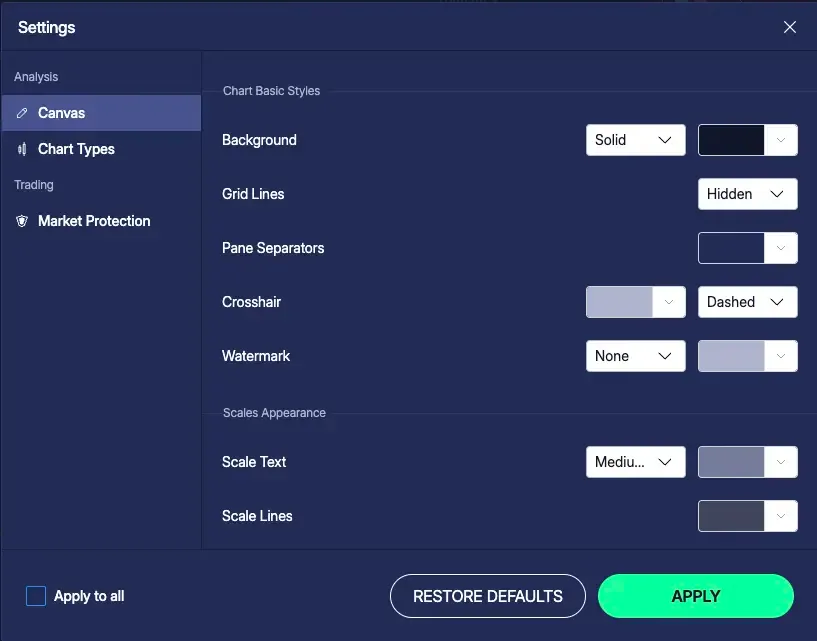
Indicator Customisation (For Everyone) 🧰

We’ve received a lot of requests around indicator customisation — hiding basis lines, changing thickness, adjusting colours, and more.

Every indicator now comes with a customisation panel, giving you full control over:

  • Visibility (show/hide plots)

  • Colours and opacity

  • Line thickness

  • Line styles (solid / dotted)

This applies to all indicators and is available to all users starting today.


Fixes & Improvements 🛠️

These were the three major feature updates this week. Alongside that, we’ve shipped a set of important fixes to make everyday trading simpler and more reliable.

Line Chart Improvements

  • Line chart colour updated to purple for better contrast across light and dark themes

  • Rendering behaviour standardised for improved visual stability across devices

Bug Fixes

  • Fixed issues with trendline and crosshair interaction

  • Improved decimal formatting on crosshair values for better price precision

We also received reports of trendlines shifting after placement or across sessions. This is now fixed


That’s all for this week.

I truly mean it when I say “We hear you.” Every post on the Builder’s Lab is read, discussed, and reviewed by the team. Please keep the feedback coming — we’ll keep building faster and better, week after week


A Small Note from me 📔

I know many of you have been waiting for Scalper Mode. We’ve faced a few delays, but I’m confident we’ll be ready to release it by next weekend. Just a few final touches left.

Thanks for your patience — and for building Punch with us.

January 14th, 2026

What's new

Issue fixed

This week, we shipped 5 subtle but powerful improvements that make day-to-day trading on Punch faster, cleaner, and more intuitive.


🎯 Customise Your Call/Put Line Actions

You can now choose what happens when you tap on Call or Put lines.

Set it so that:

  • A single tap opens the order form, and

  • A long press opens the option chart

—or swap the two, based on how you trade.

📍 Find it here:

Index chart → Call/Put line settings → Edit (Expiry) → Scroll down to set your preference.


📈 Option Price Charts — Now 1-Tap Away

Option charts are now just 1-tap away — from wherever you are.

You can now access charts directly from:

  • Order Form

  • Orderbook

  • Positions

  • Holdings

Tap on the Chart icon (beside the scrip name) to open the respective option price chart.


➕ 1-Click Horizontal Lines

Want to mark key levels instantly?

Now, just activate the crosshair and tap the + icon to drop a horizontal line on the chart — no extra steps needed.

This is perfect for drawing zones, supports, resistances while tracking live price.


📊 Heiken Ashi Now Shows Real Candle Close Too

When using Heiken Ashi, you’ll now see:

  • The LTP (Live Traded Price) and

  • The Close of the last Heiken Ashi candle

Why this matters:

• Heiken Ashi candles are smoothed, so their OHLC differ from the actual traded OHLC.
• Showing the live traded price alongside the Heiken Ashi close helps you validate breakouts, reversals, and price action signals without losing the smoothing benefit.


🔍 Full P&L Values

You asked. We listened.

We’ve stopped rounding off P&L values like ₹2.7K.

Now you’ll see the full value, like ₹2764 — clearer, more accurate, and easier to track at a glance.


🧼 Fixes You’ll Notice

  • Drawing tools disappearing after expiry on Spot charts — now fixed

  • 🔐 Login friction after logout — now re-login with just biometrics, no OTP needed


🧠 Why These Matter

Each of these changes was raised on Builder’s Lab.

They might look small in isolation, but together, they dramatically improve trading speed and flow — and their impact compounds with every session.

January 6th, 2026

What's new

Your Most-Requested Features Are Now Live for All Users 🚀

Over the past 30 days, Punch Champions got early access to two of the most powerful features built with community feedback.

Starting this week, they’re now available to everyone on Punch.


🎯 Drag & Drop SL/TP – Trade Right from the Chart

You can now set and adjust Stop Loss and Target levels visually — right on the chart.

Just grab the SL or TP line and drag it to your desired price level.

✅ Perfect for fast-paced intraday/scalping

✅ Make quick adjustments based on price action

✅ Intuitive. Visual. Fast.


🧱 New Chart Types — Heiken Ashi, Renko, Line & Bar

Your chart, your rules.

Punch now supports more than just candlesticks — explore chart types that suit your trading style:

📈 Heiken Ashi – Smooths out trends for clearer direction

📊 Renko – Filters noise, highlights clean breakouts

📉 Line & Bar – For minimalist and classic traders


🔓 These features were built with Punch Builders, tested by Champions — and now, they’re yours.

Let us know what you think — we’re just getting started.


💬 Until next week

Every idea you suggest, every vote you cast, every bug you report — gets us closer to building India’s fastest, smartest trading platform.

The #onecrazymission is real. And it’s being built with you.

See you in the lab.

— Team Punch

January 2nd, 2026

What's new

We’ve taken the classic Option Chain — and levelled it up.

The all-new Advanced Option Chain gives you pro-grade control and visibility into market data. Perfect for serious traders who want more than just LTPs and OI numbers.

💡 What’s New?

🔹 Full Customization at Your Fingertips

You decide what you see. Toggle 15+ data points including:

  • LTP, Volume, Open Interest (OI)

  • Greeks: Delta, Gamma, Theta, Vega

  • IV, % OI Change, Open/High/Low/Close

🔹 View Enhancers for Better Decisions

  • Show/Hide OI Bars for quick visual cues

  • Enable % Change to track intraday moves faster

🔹 Built for Deeper Analysis

See the market like institutions do — filter noise, track positioning, and get a precise read on sentiment.


🎯 Currently in Early Access

The Advanced Option Chain is now exclusively available to our Champion users for the next 30 days.


🚀 Become a Punch Champion

Punch Champions makes the #onecrazymission possible.

Champions help Punch grow without ads or marketing, by inviting their friends to trade on Punch. They shape the future of trading on Punch by sharing ideas and voting on the builder’s lab.

This helps keep the brokerage at ₹1.

🏆 Benefits you get as a Champion:

  1. 30-day early access to all new features

  2. 3x voting power on Builder’s Lab polls

  3. Free access to all paid educational webinars


🛠️ How to Join

🔁 Refer 2 trader friends and get them to trade on Punch

💡 Post a feature idea → If it gets 50+ votes, you’re in


Built by traders, for traders.

If you want early access, more influence, and free learning — step into the Champion’s circle today.

🟢 Refer now or head to Builder’s Lab to earn your spot.

December 17th, 2025

What's new

Issue fixed

🚀 New Features

Crosshair Sync in Split Chart Mode

Now view synced crosshairs across all charts — making comparison between Index, Call & Put seamless.

Charges Breakdown View

A much-requested feature is finally here — get a detailed view of all trading charges. Filter by day, week, month, or quarter to know exactly what you’re paying.


🧩 Fixes & Improvements

🛠️ Major Crosshair Improvements on Punch

  • Removed lag while moving the crosshair — it’s now smooth and precise

  • Fixed the jittery motion for better charting experience

  • Crosshair can now move freely beyond the last candle — no more restrictions at the edge

Volume Candle Colours Fixed (Light Mode)

  • Clarity restored — candles in volume chart now display correct colors.

Call/Put & Exit Button Responsiveness Improved

  • Reactivity issues fixed — actions now respond faster and more reliably.

App Performance Enhancements

  • Several under-the-hood improvements made to address app hang issues reported by a few users.


🛠️ Coming Soon

Scalper Mode (Final Testing Phase)

Work is nearly complete — awaiting final exchange approvals. Our biggest launch yet is almost here.

Feature Sprint Preview – Next Week

We’ve just wrapped up our monthly roundtable to pick what features Punch will build next. Next week’s changelog will include a full breakdown of what YOU voted for on the Builder’s Lab.

Stay tuned — big things ahead 👀


💬 Until next week

Every idea you suggest, every vote you cast, every bug you report — gets us closer to building India’s fastest, smartest trading platform.

The #onecrazymission is real. And it’s being built with you.

See you in the lab.

— Team Punch

December 10th, 2025

What's new

Issue fixed

We’re back with our release series — and this one’s stacked. The last few weeks have been massive at Punch. Here’s everything new, fixed, and upcoming.

🚀 Big Bang Releases

Trade-wise PnL

Track P&L for every entry–exit cycle — perfect for intraday and high-frequency traders.
🎖 Special thanks to Sanjiv Choudhary for seeding the idea.

Drag & Drop SL/TP

Our most requested feature ever on Builder’s Lab — set and modify SL/TP directly on the chart. No typing, just dragging. Clean, fast, precise.

Chart Types

Now plot Heiken Ashi, Renko, Line, and Bar charts.
🎖 Big shoutout to Ram Prasad Meena for pushing hard on this one.

Punch Champions Program

A new program to reward traders building Punch with us.

Champions get:

  • 30-day early access to all new features

  • 3x voting power on Builder’s Lab

  • Free access to all paid educational webinars


🧩 Fixes & Improvements

  • PnL Bug:

    A major Trade-wise PnL issue was identified and fixed within 1 hour of being reported.

  • Basket Order Margin Fix:

    Exit orders via basket now correctly detect as position closures — no more extra margin prompts.

  • Position Swatch Fix:

    The option chart now reflects the correct average price and strike. Y-axis mismatch and swatch errors resolved.

  • Plotted Strike Lines:

    Your plotted strikes are now saved even after app restart.


🔮 Coming Soon:

Scalper Mode

Our most ambitious feature yet — built for the fastest traders on Punch.

What’s inside Scalper Mode?

  • ⚡ 1-Click Execution — skip confirmations

  • 🧷 Bracket Orders — entry, SL & target in one tap

  • 🎯 Default SL/TP — set once, apply automatically to every order


💬 Until next week

Every idea you suggest, every vote you cast, every bug you report — gets us closer to building India’s fastest, smartest trading platform.

The #onecrazymission is real. And it’s being built with you.

See you in the lab.

— Team Punch

December 4th, 2025

What's new

This week, we’re launching two of the most demanded features — built with Punch Builders.

🎯 Drag & Drop SL/TP — Trade Right on the Chart

Set Stop Loss and Target levels directly on the chart with a simple drag & drop.

Just grab your SL or TP line and move it where you want it.

Why it matters:

  • Perfect for fast-paced intraday and scalping setups

  • Adjust your SL/TP on the fly by reacting to price action

  • Visual, intuitive and superfast


🧱 New Chart Types — Heiken Ashi, Renko, Line & Bar

Punch charts now go beyond just candlesticks.

You can now switch to:

  • Heiken Ashi – Smoothens trends, great for trend-following

  • Renko – Filters out noise, ideal for clean breakout setups

  • Line & Bar charts – For those who want minimalist clarity

Find your edge by using the chart type that fits your strategy.


👑 Access Update — Exclusively for Punch Champions

Both these features are currently available only to Punch Champions.

🔓 General access starts January 2, 2026.

Till then, only champions get to use them.


🚀 Become a Punch Champion

Punch Champions make the #onecrazymission possible.

Champions help Punch grow without ads or marketing, by inviting their friends to trade on Punch. They shape the future of trading on Punch by sharing ideas and voting on the builder’s lab.

This helps keep the brokerage at ₹1.

🏆 Benefits you get as a Champion:

  1. 30-day early access to all new features

  2. 3x voting power on Builder’s Lab polls

  3. Free access to all paid educational webinars


🛠️ How to Join

🔁 Refer 2 trader friends and get them to trade on Punch

💡 Post a feature idea → If it gets 50+ votes, you’re in


Built by traders, for traders.

If you want early access, more influence, and free learning — step into the Champion’s circle today.

🟢 Refer now or head to Builder’s Lab to earn your spot.

November 26th, 2025

What's new

🚀 What’s New

We’re launching Trade-wise P&L, a first-of-its-kind way to view your profits and losses — where every entry–exit cycle becomes its own trade with its own P&L.

Instead of showing the average price across multiple trades (which hides actual performance), your P&L is now shown per trade. Clear. Transparent. Tailored for intraday and scalping.


🧠 Why We Changed It

Traditionally, platforms show P&L based on average prices of a position — a mix of open and closed trades. This was a flawed system:

  • ❌ Hides your actual trade performance

  • ❌ Makes P&L unclear

  • ❌ Is not suitable for fast-paced intraday or scalping trades

This meant traders couldn’t easily tell which trades worked — and which didn’t.


✅ What’s Better Now

With Trade-wise P&L:

  • Every buy–sell or sell–buy pair is treated as a distinct trade

  • P&L is shown individually for each trade

  • It works beautifully for intraday, scalping and high-frequency traders


👀 See It in Action

📉 Before: Average Price Method

  • Multiple trades were clubbed together using an average entry price.

  • Example: Three trades in NIFTY 25150 Put are grouped as one, showing a single P&L of ₹1.7K — making it unclear which trade actually performed how.

✅ After: Trade-wise P&L (New)

  • Each buy-sell pair is treated as an individual trade with its own P&L.

  • Now you can see:

    • One trade in NIFTY 25150 Put → ₹868 profit

    • Another in the same scrip → ₹876 profit

    • A smaller trade → ₹-19 loss

  • No more hiding real performance behind averages.


💬 Built on Builder’s Lab

This feature was directly inspired by repeated feedback from traders. You asked for accurate P&L visibility — and it’s finally here.

November 10th, 2025

What's new

Issue fixed

Here’s what’s new, what’s fixed, and what’s cooking inside Punch — all driven by community feedback from the Builder’s Lab.


🚀 New Features

  • Continuous Charts for Futures

    Analyse long-term price action seamlessly across expiry cycles.

  • Auto-Adjust Theme

    Light mode by day, dark mode by night — now handled automatically.

  • Easier Watchlist Management

    Quickly add scrips to watchlists with a streamlined workflow.


🧩 Fixes

  • Chart Freeze Issue — resolved for smoother experience during high activity.

  • Light Mode Bugs — Expiry and LTP visibility issues now fixed.


🛠️ Under Development

  • Drag & Drop SL/TP — place and modify stop loss & target directly on chart.

  • Option Greeks in Chain — Delta, Gamma, Theta, Vega & IV.

  • FVG Indicator — a highly requested tool now in progress.


🏅 Top Contributors This Week

  • Naveen Kumar Goyal

  • Bipin Sethi

  • Wahengbam Kabichandra Singh

Your votes, comments and suggestions are shaping Punch every week.


🫶 Support the ₹1 Mission

The ₹1 mission runs on referrals, not ads. If you believe in what we’re building:

  1. Tell a trader about Punch

  2. Share your invite code

  3. Drop an honest review

Every idea builds a better product.
Every referral makes ₹1 possible.